- Published on
多类分类神经网络:手写数字0-9识别
- Authors
- Name
手写数字识别神经网络实战指南
欢迎词
在人工智能领域,手写数字识别是一个经典的入门案例,它不仅能够帮助我们理解神经网络的基本原理,还能直接应用于实际场景(如邮政编码识别、银行支票处理等)。本文将通过详细步骤,带您从零开始构建一个基于TensorFlow的神经网络模型,解决多分类问题。通过代码实战与理论结合的方式,您将掌握以下核心技能:
- 激活函数(ReLU、Softmax)的数学原理与实现
- 神经网络模型的构建与训练流程
- 模型评估与结果可视化技巧
目录
一、环境与数据准备
1.1 环境配置
Python
import numpy as np
import logging
import tensorflow as tf
from tensorflow.keras.models import Sequential
from tensorflow.keras.layers import Dense
from tensorflow.keras.activations import linear, relu, sigmoid
import matplotlib.pyplot as plt
plt.style.use('./deeplearning.mplstyle')

# 配置日志与随机种子
logging.getLogger("tensorflow").setLevel(logging.ERROR)
tf.autograph.set_verbosity(0)
tf.random.set_seed(1234)  # 确保结果可复现
1.2 数据集加载与预览
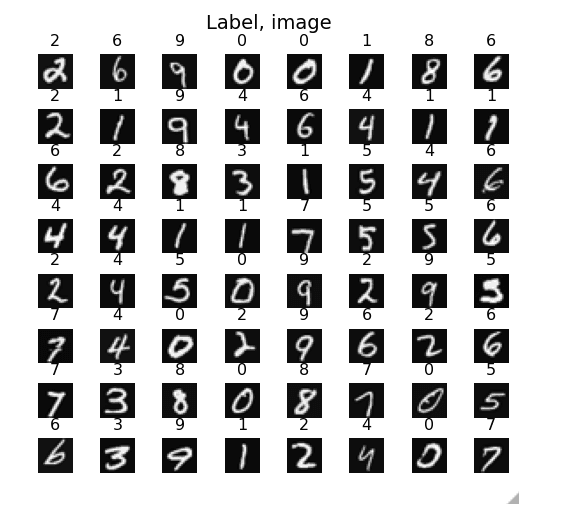
我们使用MNIST数据集的子集(5000张20×20灰度图像):
Python
X, y = load_data()  # X: (5000,400), y: (5000,1)
print(f"数据维度:X.shape={X.shape}, y.shape={y.shape}")
数据可视化示例
Python
# 随机展示64张图像
fig, axes = plt.subplots(8,8,figsize=(5,5))
for i,ax in enumerate(axes.flat):
    idx = np.random.randint(X.shape[0])
    ax.imshow(X[idx].reshape(20,20).T, cmap='gray')
    ax.set_title(f"Label: {y[idx][0]}")
    ax.axis('off')
plt.tight_layout()
plt.show()
二、关键组件解析
2.1 ReLU激活函数
数学定义:
特点:
- 非线性:解决线性模型无法拟合复杂关系的问题
- 计算高效:仅需判断正负,避免指数运算
- 缓解梯度消失:当输入较大时梯度恒为1
代码实现与可视化:
Python
def relu(z):
    return np.maximum(0, z)

z = np.linspace(-10, 10, 100)
plt.plot(z, relu(z), label='ReLU')
plt.plot(z, sigmoid(z), label='Sigmoid')
plt.legend()
plt.title('激活函数对比')
plt.show()
2.2 Softmax函数
数学定义:
实现与验证:
Python
def my_softmax(z):
    ez = np.exp(z)
    return ez / np.sum(ez)

# 测试示例
test_z = np.array([1., 2., 3., 4.])
print("自定义Softmax结果:", my_softmax(test_z))
print("TensorFlow实现结果:", tf.nn.softmax(test_z).numpy())
输出对比:
JavaScript
自定义Softmax结果: [0.03 0.09 0.24 0.64]
TensorFlow实现结果: [0.03 0.09 0.24 0.64]
三、神经网络构建
3.1 模型架构设计
采用三层全连接网络:
- 输入层:400节点(对应20×20图像像素)
- 隐藏层1:25节点 + ReLU激活
- 隐藏层2:15节点 + ReLU激活
- 输出层:10节点 + 线性激活(Softmax在损失函数中实现)
Python
model = Sequential([
    Dense(25, activation='relu', input_shape=(400,), name='Hidden1'),
    Dense(15, activation='relu', name='Hidden2'),
    Dense(10, activation='linear', name='Output')
], name='DigitRecognizer')

model.summary()
输出模型结构:
JavaScript
Model: "DigitRecognizer"
_________________________________________________________________
 Layer (type)                Output Shape              Param #
=================================================================
 Hidden1 (Dense)             (None, 25)                10025
 Hidden2 (Dense)             (None, 15)                390
 Output (Dense)              (None, 10)                160
=================================================================
Total params: 10,575
3.2 损失函数与优化器配置
Python
model.compile(
    loss=tf.keras.losses.SparseCategoricalCrossentropy(from_logits=True),
    optimizer=tf.keras.optimizers.Adam(learning_rate=0.001)
)
3.3 模型训练
Python
history = model.fit(X, y, epochs=40, verbose=1)
训练过程可视化:
Python
def plot_loss(history):
    plt.plot(history.history['loss'])
    plt.title('Training Loss')
    plt.xlabel('Epochs')
    plt.ylabel('Loss')
    plt.show()

plot_loss(history)
四、模型评估与预测
4.1 准确率计算
Python
predictions = model.predict(X)
predicted_labels = np.argmax(predictions, axis=1)
accuracy = np.mean(predicted_labels == y.squeeze())
print(f"训练集准确率:{accuracy:.2%}")
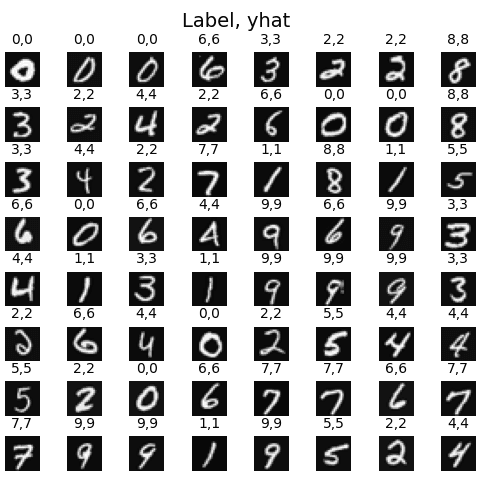
4.2 结果可视化验证
Python
# 随机展示预测结果
fig, axes = plt.subplots(8,8,figsize=(5,5))
for i,ax in enumerate(axes.flat):
    idx = np.random.randint(X.shape[0])
    img = X[idx].reshape(20,20).T
    ax.imshow(img, cmap='gray')
    pred = np.argmax(tf.nn.softmax(model.predict(X[idx:idx+1])))
    ax.set_title(f"实际: {y[idx][0]} | 预测: {pred}")
    ax.axis('off')
plt.tight_layout()
plt.show()
4.3 错误分析
Python
def display_errors(model, X, y):
    errors = []
    predictions = model.predict(X)
    pred_labels = np.argmax(predictions, axis=1)
    for i in range(len(X)):
        if pred_labels[i] != y[i]:
            errors.append(i)
    print(f"总错误数:{len(errors)}")
    # 展示部分错误样本(示例)
    fig, axes = plt.subplots(2,5,figsize=(10,4))
    for i,ax in enumerate(axes.flat):
        if i < len(errors):
            idx = errors[i]
            ax.imshow(X[idx].reshape(20,20).T, cmap='gray')
            ax.set_title(f"实际: {y[idx]} | 预测: {pred_labels[idx]}")
            ax.axis('off')
    plt.tight_layout()
    return len(errors)

display_errors(model, X, y)
五、进阶优化建议
5.1 超参数调优
- 学习率调整:尝试
0.0001到0.01的范围 - 批量大小:增大batch_size(如
64)可能加速训练 - 正则化:添加Dropout层或L2正则化:Python
from tensorflow.keras.layers import Dropout
model.add(Dense(25, activation='relu'))
model.add(Dropout(0.2))  # 20%神经元随机失活
5.2 数据增强
5.3 模型结构改进
- 增加层数:尝试添加第三个隐藏层(如
Dense(10)) - 调整节点数:如
400→50→20→10的结构
六、完整代码整合
Python
# 完整代码示例(含所有步骤)
import numpy as np
import tensorflow as tf
from tensorflow.keras.models import Sequential
from tensorflow.keras.layers import Dense, Dropout
import matplotlib.pyplot as plt

# 数据加载
X, y = load_data()

# 模型构建
model = Sequential([
    Dense(25, activation='relu', input_shape=(400,)),
    Dropout(0.2),
    Dense(15, activation='relu'),
    Dense(10, activation='linear')
])

# 编译与训练
model.compile(
    loss=tf.keras.losses.SparseCategoricalCrossentropy(from_logits=True),
    optimizer='adam'
)
history = model.fit(X, y, epochs=40, verbose=1)

# 评估与可视化
plot_loss(history)
display_errors(model, X, y)
6.1 交互式可视化探索
为了更直观地理解多分类神经网络的工作原理,我们准备了三个交互式可视化工具:
6.1.1 Softmax概率分布可视化
这个可视化展示了Softmax函数如何将原始输出转换为概率分布:
- 调整温度参数观察概率分布的变化
- 理解为什么输出层使用线性激活+Softmax组合
- 观察不同logits值对最终预测的影响
6.1.2 多分类训练过程动画
实时观察模型训练过程:
- 损失函数的下降曲线(SparseCategoricalCrossentropy)
- 每个类别的准确率变化
- 混淆矩阵的动态更新
- 学习率对收敛速度的影响
6.1.3 决策边界3D可视化
通过PCA降维展示10类数字的决策边界:
- 观察不同数字在特征空间中的分布
- 理解神经网络如何划分复杂的非线性边界
- 识别容易混淆的数字对(如4和9、3和8)
6.2 深入理解Softmax与交叉熵
6.2.1 为什么使用SparseCategoricalCrossentropy?
数学原理: 对于多分类问题,交叉熵损失定义为:
其中:
- 是样本数量
- 是类别数量(这里是10)
- 是真实标签的one-hot编码
- 是Softmax输出的预测概率
Sparse版本的优势:
Python
# 标准版本需要one-hot编码
y_onehot = tf.keras.utils.to_categorical(y, num_classes=10)
loss = tf.keras.losses.CategoricalCrossentropy(from_logits=True)

# Sparse版本直接使用整数标签(节省内存)
loss = tf.keras.losses.SparseCategoricalCrossentropy(from_logits=True)
from_logits=True的重要性:
Python
# ❌ 数值不稳定(可能导致NaN)
model.add(Dense(10, activation='softmax'))
model.compile(loss='sparse_categorical_crossentropy')

# ✅ 数值稳定(推荐)
model.add(Dense(10, activation='linear'))
model.compile(
    loss=tf.keras.losses.SparseCategoricalCrossentropy(from_logits=True)
)
6.2.2 温度缩放(Temperature Scaling)
调整Softmax的"自信程度":
Python
def softmax_with_temperature(logits, temperature=1.0):
    """
    temperature < 1: 增强自信度(概率分布更尖锐)
    temperature > 1: 降低自信度(概率分布更平滑)
    """
    scaled_logits = logits / temperature
    return tf.nn.softmax(scaled_logits)

# 示例
logits = np.array([2.0, 1.0, 0.1])
print("T=0.5:", softmax_with_temperature(logits, 0.5))  # [0.88, 0.12, 0.00]
print("T=1.0:", softmax_with_temperature(logits, 1.0))  # [0.66, 0.24, 0.10]
print("T=2.0:", softmax_with_temperature(logits, 2.0))  # [0.51, 0.31, 0.18]
6.3 常见问题与解决方案
问题1:训练损失不下降
可能原因与解决方案:
Python
# 1. 学习率过大
optimizer = tf.keras.optimizers.Adam(learning_rate=0.0001)  # 降低学习率

# 2. 数据未归一化
X_normalized = X / 255.0  # 将像素值缩放到[0,1]

# 3. 权重初始化不当
model.add(Dense(25, activation='relu',
                kernel_initializer='he_normal'))  # 使用He初始化

# 4. 梯度爆炸
model.compile(optimizer='adam', clipnorm=1.0)  # 梯度裁剪
问题2:过拟合(训练准确率高但测试准确率低)
解决方案:
Python
from tensorflow.keras.layers import Dropout
from tensorflow.keras.regularizers import l2

model = Sequential([
    Dense(25, activation='relu',
          kernel_regularizer=l2(0.01)),  # L2正则化
    Dropout(0.3),  # 30%神经元随机失活
    Dense(15, activation='relu',
          kernel_regularizer=l2(0.01)),
    Dropout(0.2),
    Dense(10, activation='linear')
])

# 早停法
early_stop = tf.keras.callbacks.EarlyStopping(
    monitor='val_loss', patience=5, restore_best_weights=True
)
history = model.fit(X, y, validation_split=0.2,
                    epochs=100, callbacks=[early_stop])
问题3:某些类别准确率特别低
诊断与优化:
Python
from sklearn.metrics import classification_report, confusion_matrix
import seaborn as sns

# 生成分类报告
predictions = model.predict(X_test)
pred_labels = np.argmax(predictions, axis=1)
print(classification_report(y_test, pred_labels))

# 绘制混淆矩阵
cm = confusion_matrix(y_test, pred_labels)
plt.figure(figsize=(10,8))
sns.heatmap(cm, annot=True, fmt='d', cmap='Blues')
plt.xlabel('Predicted')
plt.ylabel('Actual')
plt.title('Confusion Matrix')
plt.show()

# 针对性数据增强
from tensorflow.keras.preprocessing.image import ImageDataGenerator
datagen = ImageDataGenerator(
    rotation_range=10,      # 旋转±10度
    width_shift_range=0.1,  # 水平平移10%
    height_shift_range=0.1, # 垂直平移10%
    zoom_range=0.1          # 缩放10%
)
6.4 实战技巧总结
调试检查清单
Python
# ✅ 数据检查
assert X.shape[1] == 400, "输入维度错误"
assert len(np.unique(y)) == 10, "类别数量错误"
assert X.min() >= 0 and X.max() <= 1, "数据未归一化"

# ✅ 模型检查
assert model.layers[-1].units == 10, "输出层节点数错误"
assert model.layers[-1].activation.__name__ == 'linear', "输出层激活函数错误"

# ✅ 训练检查
assert 'loss' in history.history, "训练失败"
assert history.history['loss'][-1] < history.history['loss'][0], "损失未下降"
性能优化建议
使用混合精度训练(GPU加速):
Pythonfrom tensorflow.keras import mixed_precision policy = mixed_precision.Policy('mixed_float16') mixed_precision.set_global_policy(policy)数据预加载:
Pythondataset = tf.data.Dataset.from_tensor_slices((X, y)) dataset = dataset.shuffle(5000).batch(32).prefetch(tf.data.AUTOTUNE) model.fit(dataset, epochs=40)学习率调度:
Pythonlr_schedule = tf.keras.callbacks.ReduceLROnPlateau( monitor='loss', factor=0.5, patience=3, min_lr=1e-6 )
扩展学习方向
- 卷积神经网络(CNN):使用Conv2D层提升图像识别性能
- 迁移学习:使用预训练模型(如ResNet、EfficientNet)
- 集成学习:训练多个模型并投票决策
- 对抗训练:提升模型鲁棒性
七、总结与展望
通过本文的实践,我们:
- 掌握了神经网络在多分类任务中的核心组件设计
- 学习了如何通过TensorFlow实现从数据处理到模型部署的全流程
- 理解了Softmax与ReLU在解决非线性和概率输出中的关键作用
下一步建议:
- 尝试使用卷积神经网络(CNN)提升模型性能
- 将模型部署为API服务(如使用Flask)
- 探索其他数据集(如Fashion MNIST)
通过不断实践与优化,您将能够构建出更强大的AI模型!
完整代码已开源在GitHub仓库
本篇文章的部分内容和思想参考了 吴恩达 (Andrew Ng) 在 Coursera 机器学习课程 中的讲解,感谢他对机器学习领域的卓越贡献。