- Published on
决策树实战:从零构建蘑菇分类器
- Authors

- Name
- Allen Wang
在这篇博客中,我们将一起动手实现一个决策树,从头构建一个模型,用来判断蘑菇是可食用还是有毒。想象一下,你将用简单的规则,把杂乱的数据变成清晰的分类决策——这正是决策树的魅力所在!无论你是机器学习新手还是想复习基础,这篇文章都会带你一步步理解决策树的原理和实现。准备好了吗?让我们开始吧!
目录
1 - 准备工具包
在动手之前,我们需要准备一些 Python 工具,它们是我们实现决策树的好帮手:
- NumPy:处理数组和数学运算的利器,帮我们快速计算熵和信息增益。
- Matplotlib:绘图工具,让我们把决策树和数据可视化,直观感受结果。
utils.py:一个辅助文件,包含一些现成的函数,比如加载数据和可视化树。我们不用改它,直接用就行。
运行以下代码,加载这些工具:
import numpy as np
import matplotlib.pyplot as plt
from utils import *
%matplotlib inline
关于 utils.py:
你可以把 utils.py 想象成一个“工具箱”,里面有 load_data()(加载数据)和 generate_tree_viz()(画树)等函数。这些都是现成的,我们直接调用就好,不用自己从头写,省时又省力。
这些工具准备好后,我们就可以进入正题了!
2 - 问题背景
假设你开了一家野生蘑菇公司,专门种植和销售蘑菇。但有个问题:不是所有蘑菇都能吃,有的甚至有毒!为了安全起见,你希望根据蘑菇的外观特征(比如帽子的颜色、茎的形状、是否单独生长),判断它是否可食用。你已经收集了一些数据,接下来我们要用这些数据训练一个决策树模型,帮你快速分辨哪些蘑菇可以放心卖。
任务: 用决策树判断蘑菇是可食用(1)还是有毒(0)。
注意: 这只是个教学例子,真实生活中别靠这个数据集挑蘑菇吃哦!
3 - 数据集概览
让我们先加载数据集,看看我们要处理什么。以下是数据的一个样本:
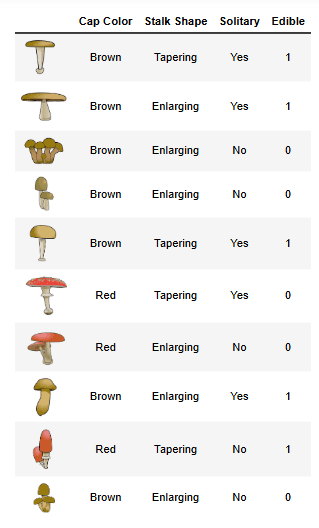
- 数据包含 10 个蘑菇样本,每个样本有 3 个特征:
- 帽子颜色:棕色(Brown)或红色(Red)。
- 茎形状:变细(Tapering,像“/”)或变粗(Enlarging,像“/\”)。
- 是否单独生长:是(Yes)或否(No)。
- 标签:可食用(1)或有毒(0)。
3.1 独热编码数据集
为了让计算机更容易处理,我们把这些特征变成了“0”和“1”的形式(叫独热编码)。看下面转换后的数据:
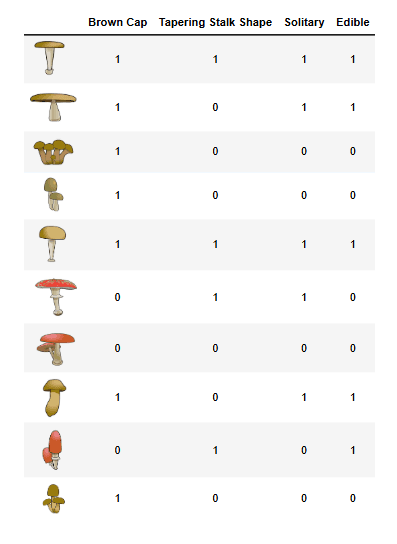
- X_train:特征矩阵,每行是一个样本,每列是一个特征(棕色帽子、变细茎、单独生长)。
- y_train:标签数组,1 表示可食用,0 表示有毒。
加载数据:
X_train = np.array([[1,1,1], [1,0,1], [1,0,0], [1,0,0], [1,1,1],
                    [0,1,1], [0,0,0], [1,0,1], [0,1,0], [1,0,0]])
y_train = np.array([1, 1, 0, 0, 1, 0, 0, 1, 1, 0])
探索数据
我们先打印数据,看看它长什么样:
print("X_train 前五行:\n", X_train[:5])
print("X_train 类型:", type(X_train))
输出:
X_train 前五行:
 [[1 1 1]
  [1 0 1]
  [1 0 0]
  [1 0 0]
  [1 1 1]]
X_train 类型: <class 'numpy.ndarray'>
再看看标签:
print("y_train 前五个元素:", y_train[:5])
print("y_train 类型:", type(y_train))
输出:
y_train 前五个元素: [1 1 0 0 1]
y_train 类型: <class 'numpy.ndarray'>
检查数据规模
用 shape 查看数据维度:
print('X_train 形状:', X_train.shape)
print('y_train 形状:', y_train.shape)
print('样本数:', len(X_train))
输出:
X_train 形状: (10, 3)
y_train 形状: (10,)
样本数: 10
X_train是 10 行 3 列的矩阵,10 个样本,每个样本 3 个特征。y_train是 10 个标签,和样本数对应。
4 - 决策树基础
决策树就像一个“问答游戏”:通过一系列问题,把数据分成不同的组,最终判断每个蘑菇是可食用还是有毒。构建决策树的过程是:
- 从根节点开始,包含所有样本。
- 计算每个特征的信息增益,选择增益最大的那个特征来分割。
- 根据选定的特征,把数据分成左右两个分支。
- 对每个分支重复这个过程,直到满足停止条件(比如达到最大深度)。
在这部分,我们将实现几个核心函数:
- 计算熵(衡量数据的混乱程度)。
- 分割数据集。
- 计算信息增益。
- 选择最佳分割特征。
我们设定最大深度为 2,也就是说树最多分两层。
4.1 计算熵
熵(entropy)是衡量数据“混乱度”的指标。如果一个节点里全是可食用的蘑菇(或全是有毒的),熵是 0;如果一半一半,熵最高。我们用它来判断分割前后的混乱度变化。
熵的公式是:
- 可食用比例是
p1,则熵H(p1) = -p1 * log2(p1) - (1-p1) * log2(1-p1)。 - 特殊情况:如果
p1 = 0或1,熵设为 0(因为 0 * log(0) 定义为 0)。
动手练习 1:实现熵计算
完成下面的 compute_entropy 函数:
def compute_entropy(y):
    """
    计算节点的熵。

    参数:
        y (ndarray): 节点样本的标签数组(1 表示可食用,0 表示有毒)

    返回:
        entropy (float): 熵值
    """
    entropy = 0.

    if len(y) != 0:  # 检查数据是否为空
        p1 = len(y[y == 1]) / len(y)  # 计算可食用比例
        if p1 != 0 and p1 != 1:  # 如果不是全 0 或全 1
            entropy = -p1 * np.log2(p1) - (1 - p1) * np.log2(1 - p1)
        else:
            entropy = 0.

    return entropy
代码详解:
len(y[y == 1]):计算标签为 1 的样本数。p1:可食用比例,比如根节点有 5 个 1,5 个 0,则p1 = 0.5。- 熵公式:用 NumPy 的
np.log2计算以 2 为底的对数。
测试一下: 在根节点(包含所有样本)计算熵:
print("根节点熵:", compute_entropy(y_train))
输出:
根节点熵: 1.0
- 根节点有 5 个可食用,5 个有毒,
p1 = 0.5,熵正好是 1,说明数据完全“混乱”,需要分割。
4.2 数据集分割 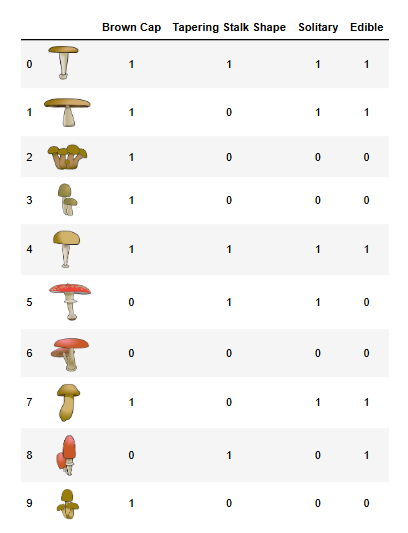
接下来,我们要实现一个函数,把数据按某个特征分成两组。比如,按“是否单独生长”分割,值为 1 的去左分支,值为 0 的去右分支。
动手练习 2:实现数据分割
完成 split_dataset 函数:
def split_dataset(X, node_indices, feature):
    """
    根据特征分割数据集。

    参数:
        X (ndarray): 数据矩阵,形状 (样本数, 特征数)
        node_indices (list): 当前节点的样本索引
        feature (int): 要分割的特征索引

    返回:
        left_indices (list): 特征值为 1 的索引
        right_indices (list): 特征值为 0 的索引
    """
    left_indices = []
    right_indices = []

    for i in node_indices:
        if X[i][feature] == 1:
            left_indices.append(i)
        else:
            right_indices.append(i)

    return left_indices, right_indices
代码详解:
X[i][feature]:第 i 个样本的第 feature 个特征值。- 如果值为 1,放进
left_indices;值为 0,放进right_indices。
测试一下: 在根节点(所有样本)按特征 0(棕色帽子)分割:
# Case 1
root_indices = [0, 1, 2, 3, 4, 5, 6, 7, 8, 9]
feature = 0
left_indices, right_indices = split_dataset(X_train, root_indices, feature)
print("左分支索引(棕色帽子):", left_indices)
print("右分支索引(红色帽子):", right_indices)
generate_split_viz(root_indices_subset, left_indices, right_indices, feature)
split_dataset_test(split_dataset)
# Case 2
root_indices_subset = [0, 2, 4, 6, 8]
feature = 0
left_indices, right_indices = split_dataset(X_train, root_indices, feature)
print("左分支索引(棕色帽子):", left_indices)
print("右分支索引(红色帽子):", right_indices)
generate_split_viz(root_indices_subset, left_indices, right_indices, feature)
split_dataset_test(split_dataset)
输出:
左分支索引(棕色帽子): [0, 1, 2, 3, 4, 7, 9]
右分支索引(红色帽子): [5, 6, 8]
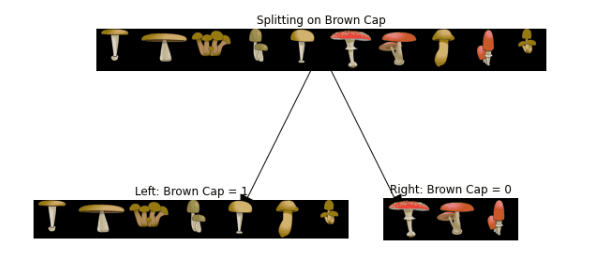
左分支索引(棕色帽子): [0, 2, 4]
右分支索引(红色帽子): [6, 8]
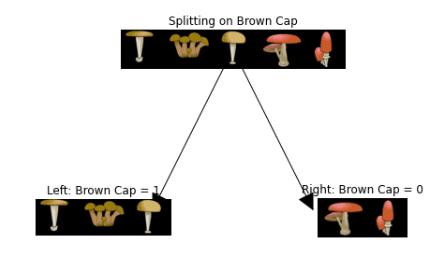
- 棕色帽子(1)的样本去了左分支,红色帽子(0)的去了右分支。
4.3 计算信息增益
信息增益(Information Gain)衡量分割后数据混乱度的减少量。公式是:
- 信息增益 = 节点熵 - (左分支权重 _ 左分支熵 + 右分支权重 _ 右分支熵)。
动手练习 3:实现信息增益
完成 compute_information_gain 函数:
def compute_information_gain(X, y, node_indices, feature):
    """
    计算按某特征分割的信息增益。

    参数:
        X (ndarray): 数据矩阵
        y (ndarray): 标签数组
        node_indices (list): 当前节点样本索引
        feature (int): 分割特征索引

    返回:
        information_gain (float): 信息增益
    """
    left_indices, right_indices = split_dataset(X, node_indices, feature)

    X_node, y_node = X[node_indices], y[node_indices]
    X_left, y_left = X[left_indices], y[left_indices]
    X_right, y_right = X[right_indices], y[right_indices]

    node_entropy = compute_entropy(y_node)
    left_entropy = compute_entropy(y_left)
    right_entropy = compute_entropy(y_right)

    w_left = len(X_left) / len(X_node)
    w_right = len(X_right) / len(X_node)

    weighted_entropy = w_left * left_entropy + w_right * right_entropy
    information_gain = node_entropy - weighted_entropy

    return information_gain
代码详解:
w_left和w_right:左右分支的样本比例。weighted_entropy:加权后的分支熵。- 信息增益:分割前熵减去加权后熵。
测试一下: 计算根节点按每个特征分割的信息增益:
for feature in range(3):
    info_gain = compute_information_gain(X_train, y_train, root_indices, feature)
    print(f"特征 {feature} 的信息增益: {info_gain}")
输出:
特征 0 的信息增益: 0.034851554559677034
特征 1 的信息增益: 0.12451124978365313
特征 2 的信息增益: 0.2780719051126377
- 特征 2(单独生长)的增益最高,所以它是根节点的最佳分割特征。
4.4 选择最佳分割
现在,我们要找信息增益最大的特征,作为分割依据。
动手练习 4:找到最佳特征
完成 get_best_split 函数:
def get_best_split(X, y, node_indices):
    """
    找到最佳分割特征。

    参数:
        X (ndarray): 数据矩阵
        y (ndarray): 标签数组
        node_indices (list): 当前节点样本索引

    返回:
        best_feature (int): 最佳特征索引
    """
    num_features = X.shape[1]
    best_feature = -1
    max_info_gain = 0

    for feature in range(num_features):
        info_gain = compute_information_gain(X, y, node_indices, feature)
        if info_gain > max_info_gain:
            max_info_gain = info_gain
            best_feature = feature

    return best_feature
测试一下:
best_feature = get_best_split(X_train, y_train, root_indices)
print("最佳分割特征:", best_feature)
输出:
最佳分割特征: 2
- 特征 2(单独生长)被选中,和我们上面的分析一致。
5 - 构建决策树
有了以上函数,我们可以用递归的方式构建决策树。以下是现成的代码(无需修改),它会按最大深度 2 构建树并打印结果:
tree = []
def build_tree_recursive(X, y, node_indices, branch_name, max_depth, current_depth):
    if current_depth == max_depth:
        print("  " * current_depth + f"{branch_name} 叶节点,索引: {node_indices}")
        return

    best_feature = get_best_split(X, y, node_indices)
    print("  " * current_depth + f"深度 {current_depth}, {branch_name}: 分割特征 {best_feature}")

    left_indices, right_indices = split_dataset(X, node_indices, best_feature)
    tree.append((left_indices, right_indices, best_feature))

    build_tree_recursive(X, y, left_indices, "左分支", max_depth, current_depth + 1)
    build_tree_recursive(X, y, right_indices, "右分支", max_depth, current_depth + 1)

build_tree_recursive(X_train, y_train, root_indices, "根节点", max_depth=2, current_depth=0)
generate_tree_viz(root_indices, y_train, tree)
输出:
深度 0, 根节点: 分割特征 2
  深度 1, 左分支: 分割特征 0
    左分支 叶节点,索引: [0, 1, 4, 7]
    右分支 叶节点,索引: [5]
  深度 1, 右分支: 分割特征 1
    左分支 叶节点,索引: [8]
    右分支 叶节点,索引: [2, 3, 6, 9]
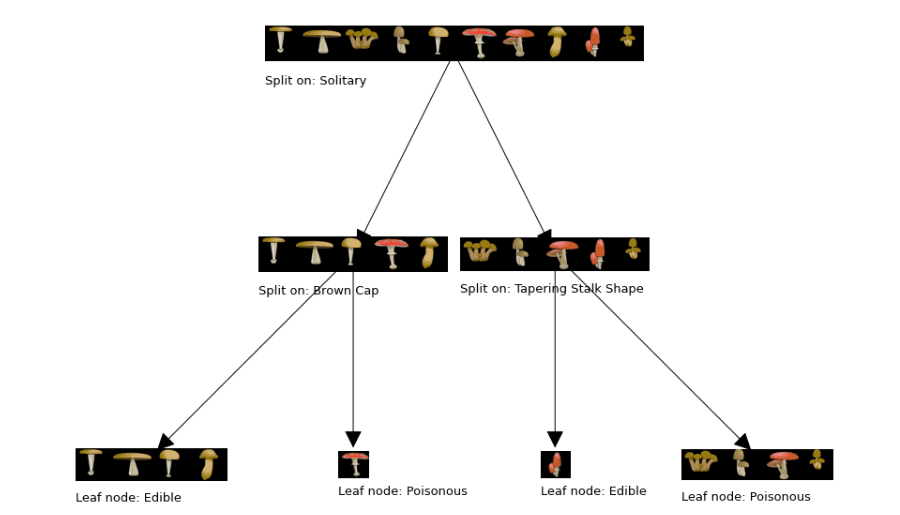 可视化: 可以用
 generate_tree_viz 画出树(需要 utils.py 支持),结果是一棵两层的决策树,根节点按“单独生长”分割,下一层分别按“棕色帽子”和“变细茎”分割。6 - 交互式可视化探索
为了让“熵 → 信息增益 → 分裂策略”更直观,这里加入 3 个交互模块:
6.1 新手常见误区
- 误区1:信息增益越大越好,直接无限分裂
现实中会过拟合,需要限制深度或做剪枝。 - 误区2:训练集准确率高就代表模型好
要同时看验证集/测试集表现。 - 误区3:决策树不需要特征工程
脏数据、噪声特征仍会误导分裂。
总结
恭喜你完成了这场决策树实战!通过这篇博客,你学会了:
- 如何用熵衡量数据的混乱度。
- 如何按特征分割数据并计算信息增益。
- 如何选择最佳特征,递归构建决策树。
这棵树虽然简单,但已经能帮我们判断蘑菇的可食用性了!决策树是机器学习的基础,掌握它后,你可以进一步探索随机森林等高级模型。
完整代码已开源在GitHub仓库
本篇文章的部分内容和思想参考了 吴恩达 (Andrew Ng) 在 Coursera 机器学习课程 中的讲解,感谢他对机器学习领域的卓越贡献。